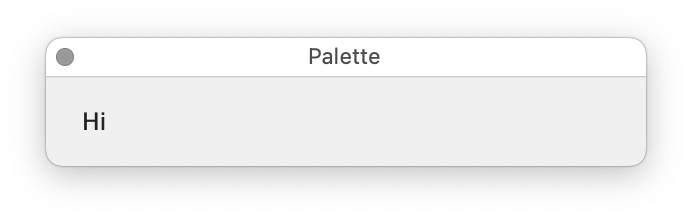
When run from the Scripts window in InDesign, the script below will show a small palette.
#target "InDesign"
#targetengine "session"

// A permanent window can’t be defined inside a function.
var palette = new Window("palette");

// Run
showPalette();

function showPalette() {
  // Make certain that user interaction (display of dialogs, etc.) is turned on.
  app.scriptPreferences.userInteractionLevel = UserInteractionLevels.interactWithAll;

  // Title of the window
  palette.text = "Palette";

  // Minimum and maximim width and height of the window
  palette.minimumSize = [300, 10];
  palette.maximumSize = [600, 100];

  // Content
  var text = palette.add("statictext", undefined, undefined, {name: 'info'});
  text.text = "Hi";

  palette.show();
}
Notes
#target
#target "InDesign"When run from the Scripts window in InDesign, it doesn’t seem neccesary to add #target. I keep it in anyway, so I know where I can use this script.
#targetengine
#targetengine "session"In InDesign #targetengine is a way to remember the values of global variables. For "session" any name can be set. As long as InDesign is running, global variables in "session" keep preserved..
See What is #targetengine? on Stack Overfow.
Width and height of the window
// width and height of the window
palette.size = [600, 400];
Results in a palette with a fixed size. Most of the time I don’t want that.
palette.size = [500,300];
palette.size = {width: 500, height: 300};
palette.size = "width: 500, height: 300";
Three different notations possible. Surprisingly, palette.size.width does not work for me.
// Minimum and maximim width and height of the window
palette.minimumSize = [300, 10];
palette.maximumSize = [600, 100];
Minimum and maximim sizes are useful constraints.
Resize window
There are events onResize and onResizing. It seems however not possible to resize the window by hand.
onResize()
→ void
// An event-handler callback function, called after the window has been resized

onResizing()
→ void
// An event-handler callback function, called while a window is being resized
Conclusion
Most of the time I just set a width and let the content dictate what the height of the window should be.
If you have some minimal content when ‘nothing’ is happening, like a ‘Select some text for this script to work’-warning for example, even a minimum height is not necessary.
Learn more
- Peter Kahrel’s Script UI For Dummies
- Joonas Pääkkö’s dialog builder (Chromium browsers only)